Completely free
The current browser-extension workflow needs no subscription or paid unlock. Install it and use the full export flow without choosing a plan or spending row credits.
Completely free social-media browser extensions, starting with data export and extending to cleanup, extraction, downloads, sorting, and privacy-protective page tools.
Completely free, user-friendly, risk-control strategy
Built for social workflows with clear responsible-use limits
We help organize web page data into spreadsheets.
Web Tidy · Chrome Web Store
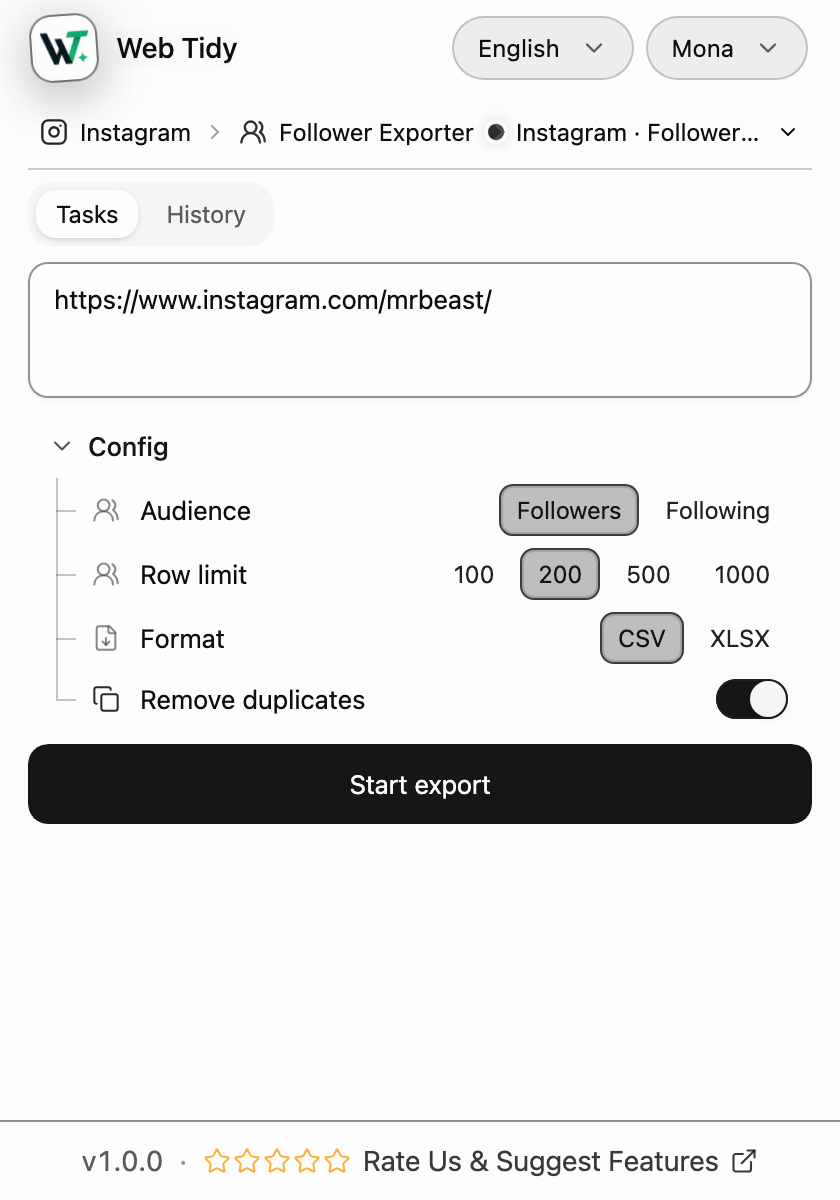
100% Free, No Login; enter an Instagram profile, choose Followers or Following, then export a CSV or XLSX file for your own review.
Available from Chrome Web Store.
02 — Real results
The web preview on the left renders the same interactive plugin console you get after installation. You can try the controls without starting a live collection. On the right, the file writer shows its 14-column output using 50 real follower rows exported from @mrbeast on August 15, 2026.
| id | pk | username | profileUrl | fullName | profilePicUrl | isVerified | followedByViewer | requestedByViewer | audience | sourceProfile | sourceProfileUrl | collectedAt | rowIndex |
|---|---|---|---|---|---|---|---|---|---|---|---|---|---|
| — | |||||||||||||
| — | |||||||||||||
| — | |||||||||||||
| — | — | — | |||||||||||
| — | — | ||||||||||||
| — | — | ||||||||||||
| — | — | ||||||||||||
| — | — | ||||||||||||
| — | — | ||||||||||||
| — | — |
1–10 / 50
Source: collected from instagram.com/mrbeast on August 15, 2026. The exported row order is preserved; long avatar URLs after row 3 are omitted from this page preview.
03 — Product values
We focus on helping people move data from web pages into useful spreadsheets with less friction and a clearer workflow.
The current browser-extension workflow needs no subscription or paid unlock. Install it and use the full export flow without choosing a plan or spending row credits.
The target profile, export settings, task progress, results, and history stay together in one clear popup. A consistent layout makes every task state easier to find and review.
Enter a profile, choose Followers or Following, set the row limit and file format, then start a bounded task. Download CSV or XLSX when it finishes and continue in your spreadsheet.
Web Tidy does not claim another tool's automated follows, likes, comments, or daily action limits. This section describes only controls visible in the current INS Follower Exporter code and tests.
The task uses the current Instagram browser session and does not ask for pasted passwords or cookie values. Actual access still depends on the account and Instagram.
05
Export workflow
I used to copy follower names back and forth from the page. Now I enter a profile, choose Followers and 500 rows, watch the task progress, and download XLSX when it finishes. The whole process is much clearer.
Emily Carter
Social Media Manager
Access and control
I do not need another account or have to give the tool my Instagram password. If access is limited, the task stops and tells me while keeping confirmed rows. That makes the workflow feel more controlled.
Daniel Brooks
Independent Store Owner
Spreadsheet cleanup
The exported columns stay in the same order, so I can continue filtering in Google Sheets. I can also download the file again from History instead of copying a pile of usernames into a temporary document.
Sofia Martinez
Operations Analyst
06 — FAQ
Straight answers to the questions most likely to matter before installation. Two columns on desktop, one on mobile.